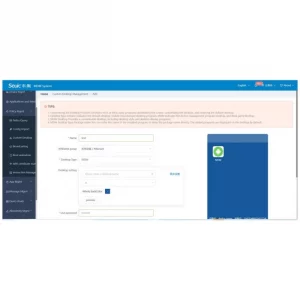
Seuic EMM is a manufacturer’s platform for centralized management of a fleet of SEUIC Android devices : application deployment and updates, security policies, kiosk mode , inventory, remote configuration. Available in the cloud or on-premise . Free when purchasing 200 devices or more.
SEUIC Application Management is the official Android tool for managing corporate applications on SEUIC terminals: hiding icons , protection against deletion , auto-start , enabling/disabling access , and centralized overview — all from a single interface.
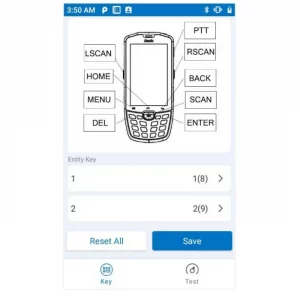
ShortCut Key is the official Android application of SEUIC , which allows you to reassign physical keys of the terminal: open the desired applications, launch operations or send broadcast commands with the desired parameters. There is a test page , quick profile switching and reset to factory settings .
SEUIC FeatureSettings is a system tool for quickly configuring buttons, modes, and policies on SEUIC Android terminals. Lock HOME/virtual keys , enable Glove Mode , set Fixed/USB charging , control wake/sleep , status bar , keyboard , floating scan button , and other settings.
Battery Management is a SEUIC application for live battery monitoring: operating time/charging forecast, SOC % , temperature , “GOOD/overheating/low charge” status, 30-day history , notifications (30%/5%), application power consumption control and quick switches (brightness, Wi-Fi, Bluetooth, GPS, NFC, etc.).
Find RFID is an application for SEUIC (UHF)portable terminals . It shows a list of nearby tags , the signal strength (RSSI) and guides to the selected tag with a sound and vibration in the style of a “Geiger counter”. There is a list clearing , filters and a quick exit.
Seuic Data Wedge allows you to send data from the scanner simply to any application without rewriting the code: keyboard emulation , Intent , TCP/IP , separate profiles for applications, formatting (prefixes/suffixes/masks) and a floating PTT button . There is a Scan Demo for tests, import/export of settings.
SEUIC Scan Tool gives you full control over scanning parameters on SEUIC Android terminals: Aim/DPM/Illumination , MultiCode , sound/vibration/LED , data formatting (prefixes/suffixes, filters, replacements) and output to Focus/Broadcast/EmuKey/Clipboard . Work with profiles , differentiate admin/user and deploy the same settings across the fleet.
Wireless scan-pass is an easy way to send scans from SEUIC handheld terminals to a PC on a local network or via Bluetooth , without changing your software. The operator scans – the data automatically enters the active input field (form, Excel, browser, WMS client) or into the client program for further processing.
Mobile Butler is an alternative launcher for SEUIC devices: create a list of allowed applications on the desktop, protect settings with a password , enable autorun after power on, add bookmarks and customize wallpaper/title . Easier, safer, faster to change.
To provide you with the best experience, we use technologies such as cookies to store and/or access information about your device. Consent to the use of these technologies will allow us to process data such as your online behavior or unique identifiers on this site. Refusing or withdrawing consent may adversely affect certain features and capabilities.
Functionality
Always active
Technical storage or access is strictly necessary for the legitimate purpose of enabling the use of a specific service explicitly requested by the subscriber or user, or solely for the purpose of carrying out the transmission of a message over an electronic communications network.
Preferences
The technical storage or access is necessary for the legitimate purpose of storing preferences that are not requested by the subscriber or user.
Statistics
Technical storage or access used exclusively for statistical purposes.The technical storage or access that is used exclusively for anonymous statistical purposes. Without a subpoena, voluntary compliance on the part of your Internet Service Provider, or additional records from a third party, information stored or retrieved for this purpose alone cannot usually be used to identify you.
Marketing
Technical storage or access is necessary to create user profiles to send advertising or to track the user on a website or across multiple websites for similar marketing purposes.











 English
  Polski
  Українська